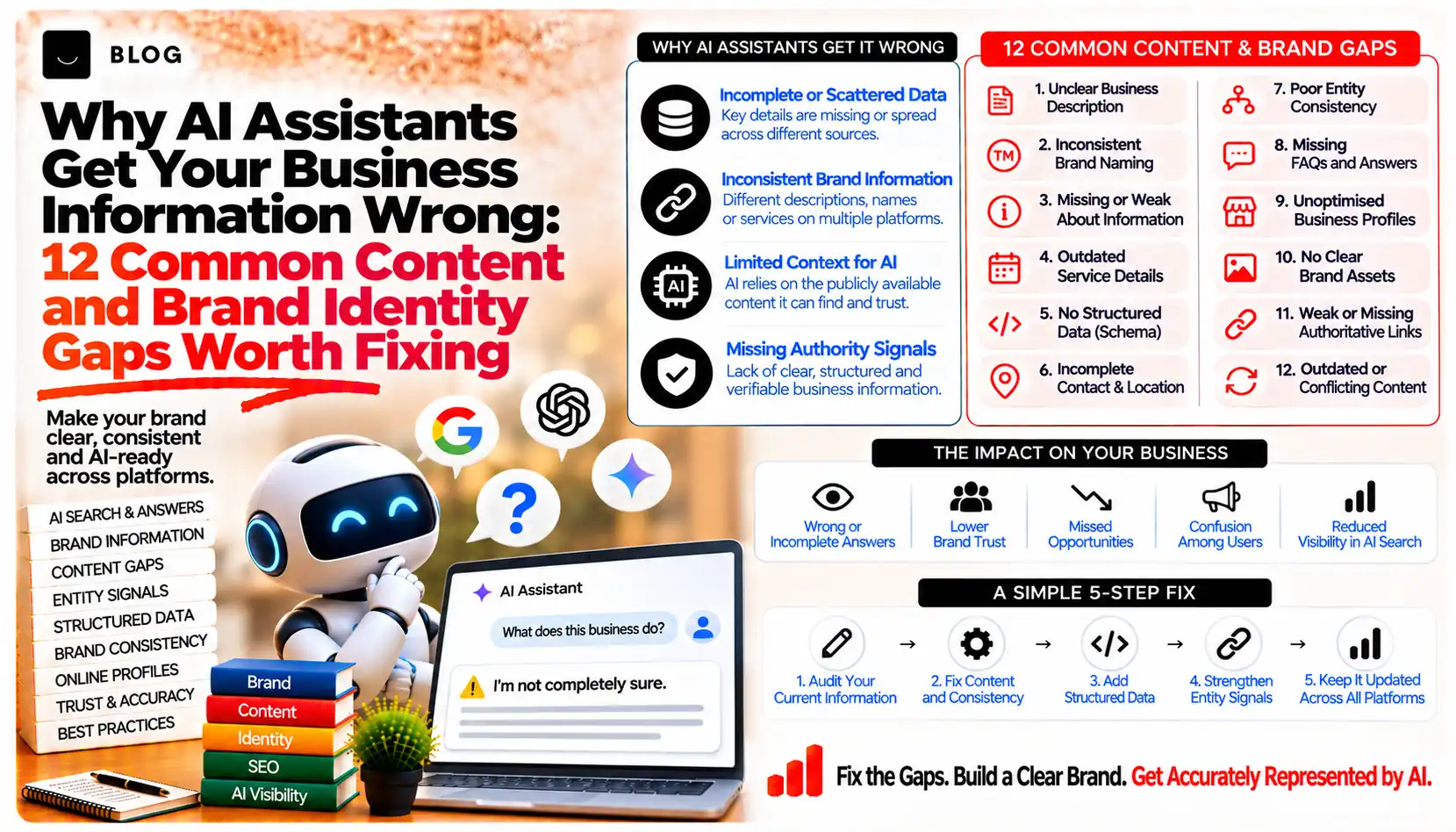
Why AI Assistants Get Your Business Information Wrong: 12 Common Content and Brand Identity Gaps Worth Fixing
An assistant tells a customer your clinic closes at 5 pm, when it closes at 7. Another recommends a service you stopped offering two years ago. A third mixes you up with a business that has a similar name in a different city. None of these customers ever visit your website to find out the truth, so you rarely hear about the mistake.
It is tempting to blame the technology, and part of the blame belongs there. OpenAI's own research on hallucinations explains that language models can produce plausible but false statements, and that obscure, low-frequency facts are especially hard to get right. But a large share of business errors have a more ordinary cause: the information available about the business is conflicting, out of date, vague or hidden.
This guide covers 12 content and brand identity gaps that lead to wrong answers, grouped into four themes. Each includes the symptom, the likely cause and the fix. None of them guarantees a correct answer, but together they remove the most avoidable reasons for an error.
Why assistants get business details wrong
Assistants build answers from two broad sources: patterns learned during training and pages retrieved at the time of the question. Google describes its own generative AI features as relying on retrieval from its Search index to improve accuracy and freshness. When the retrieved pages disagree with each other, are outdated or say little, the answer inherits those problems.
OpenAI's research adds a second factor. Models are often rewarded for giving an answer rather than admitting uncertainty, so when information is thin they may produce a confident guess. A business with clear, consistent, easy-to-find facts leaves less room for guessing.
What fixing these gaps can and cannot do
Correcting your sources can reduce errors and make them easier to trace. It cannot force any assistant to change an answer on demand, and it cannot remove errors that come from sources you do not control. You will usually need to fix your own website first, then profiles and directories, then ask third parties to correct their listings. Google notes that a verified official representative can update a Google knowledge panel to override information it finds automatically, but other assistants have no equivalent guaranteed route.
Part 1: Conflicting or outdated facts
1. Different details across your website, profiles and directories
Symptom: The assistant gives a phone number, address or service list that matches one source but not another.
Cause: Your name, address, phone number, hours or categories differ between your site, Google Business Profile, social pages and directories. An assistant retrieving several of them has no way to know which is right.
Fix: Choose one master record. Update your website first, then every profile and directory to match it exactly. Google advises keeping Business Profile information up to date.
2. Outdated pages that are still live
Symptom: The assistant mentions a discontinued service, an old price or a team member who has left.
Cause: Old blog posts, service pages and press pages remain indexed with no date or note that they are superseded.
Fix: List pages with prices, services, staff or policies. Update them, redirect them to the current page or remove them. Add a visible "last reviewed" date to pages where facts change.
3. Leftovers from a rebrand or move
Symptom: The assistant uses a previous company name, an old address or a retired logo.
Cause: Third-party sites, old press coverage and early directory listings still carry the former details.
Fix: Say plainly on your About page what changed and when, for example "formerly known as...". Then contact the highest-visibility sites that still show the old details and request an update.
4. Hours, holiday closures and temporary changes
Symptom: The assistant says you are open when you are closed, or the reverse.
Cause: Special hours were set on one platform but not others, or a temporary notice sits only on a social post.
Fix: Keep opening hours in text on your Contact page, and update special hours on every profile before each holiday. Remove temporary notices once they expire.
Part 2: Unclear identity
5. A name that is easy to confuse with others
Symptom: The assistant describes a different business with a similar name, or merges two together.
Cause: Generic or common names, and no clear statement of your legal name, trading name, city and industry in one place.
Fix: State your full name, location and what you do in the first lines of the homepage and About page. Use the same form of the name everywhere, and link to your official profiles from your site.
6. No clear statement of what you do and do not do
Symptom: The assistant lists services you do not offer, or assumes you serve customers you do not.
Cause: Vague descriptions and broad claims leave room for interpretation. Systems fill gaps with what is typical for your industry.
Fix: For each service, write what is included, what is not and who it suits. Exclusions prevent wrong assumptions.
7. A vague service area or location
Symptom: The assistant recommends you for areas you do not serve, or says you are not available in areas you do.
Cause: "Nationwide" or "across the region" claims, or location pages that list areas without real local detail.
Fix: List the specific areas served, how you serve them and any conditions. Align this with your Business Profile service area settings.
8. Several brands or entities that are never explained
Symptom: The assistant attributes one company's services, reviews or address to another within the same group.
Cause: Parent companies, subsidiaries, sister sites or franchise locations share branding without a clear explanation of how they relate.
Fix: Add a short "how our group is organised" section stating which entity provides which service, with links between the official sites. Make sure each location or brand has its own accurate page.
Part 3: Missing or hidden information
9. Key facts locked in PDFs, images or forms
Symptom: The assistant says it could not find your prices, brochure details or policies, or repeats figures from an old version.
Cause: Important details sit in downloadable files, text over images or behind "request a quote" forms. Google recommends making important content available in text form.
Fix: Publish the essential facts as page text. Keep PDFs as supporting downloads, and make sure the page and the PDF say the same thing.
10. No single, clear page that establishes who you are
Symptom: Answers about the business are generic or drawn mainly from third-party sites.
Cause: A thin About page, no named people and no obvious home for official company information.
Fix: Build an About page with the company's full name, history, location, leadership, credentials and contact details. Link to it from the footer and from profiles. Verify the site in Search Console and add accurate Organization structured data, which Google documents as a way to help it understand your organisation.
Part 4: Conflicting outside signals
11. Reviews and third-party content that contradict your site
Symptom: The assistant repeats a complaint about a problem you fixed, or describes a service as you offered it years ago.
Cause: Old reviews, forum threads and articles remain visible and carry weight, and unanswered reviews leave the old story unchallenged.
Fix: Respond professionally to reviews, noting what has changed. Ask recent customers for reviews that name the current service. Contact publishers of outdated articles to request updates. Never post fake reviews or pressure reviewers.
12. Structured data and profiles that disagree with the page
Symptom: Different Google or assistant surfaces show different details for the same business.
Cause: Markup, Business Profile and visible page text were updated at different times. Google states that structured data should match the visible text on the page.
Fix: Treat your visible page as the master, then align markup and profile fields to it. Validate markup after every site update. Remember that structured data is not required for AI features and no special markup exists for them.
How to audit and correct errors, step by step
- Write a prompt list. Prepare 15 questions a customer might ask about your business: name and location, opening hours, services, prices, who runs it, reviews and how to contact you.
- Run them in several assistants. Use ChatGPT, Gemini and Perplexity. Record each answer, the sources it cites and the date, because answers vary between sessions.
- Classify every error. Is the fact outdated, conflicting, missing, attached to the wrong business or unsupported?
- Trace it to a source. Open each cited page or listing and find where the wrong detail comes from. If no source is cited, look for the same wrong detail on your own site and major directories.
- Fix the source of truth first. Correct your own website, then your profiles, then third-party listings.
- Re-test after a few weeks. Run the same prompts again and compare. Repeat monthly.
Use this table to decide where to start.
| Error type | Fix first | Then |
|---|---|---|
| Wrong hours, phone or address | Contact page and Google Business Profile | Directories and social profiles |
| Discontinued service still mentioned | Service pages, plus redirects or removal of old pages | Articles and listings that describe it |
| Mixed up with another business | About page with full name, location and industry | Profiles, Organization markup and, if verified, your Google knowledge panel |
| Old name or old address | About page with a "formerly known as" note | Press mentions and directories |
| Old complaint repeated | Replies to the review plus recent reviews | Outreach to publishers of outdated content |
Common mistakes to avoid
Fixing the website but not the listings. Assistants can retrieve either. Leaving old directory entries in place keeps the conflict alive.
Using several versions of the business name. "Acme Ltd", "Acme Group" and "Acme Solutions" look like three entities to a system that matches text.
Trying to overwhelm bad information with new pages. Mass-producing duplicate or low-value pages can breach spam policies and does not address the underlying conflict.
Expecting an instant correction. OpenAI and Perplexity say robots.txt changes can take around 24 hours to be reflected, and Google says recrawling can take days to months. Wider corrections take longer.
Treating one wrong answer as the whole picture. Answers vary by session, phrasing and location. Look for patterns across repeated tests before acting.
Conclusion
Assistants get business information wrong for reasons that are partly technical and partly self-inflicted. The self-inflicted part, conflicting details, outdated pages, unclear identity and hidden facts, is within your control. Fixing it will not guarantee a perfect answer from any assistant, but it gives them consistent, current and easy-to-find facts to work with.
Begin with one afternoon: run the 15 prompts, list the errors and trace the three most serious ones to their source.
If you would like an independent review, Crescent Digital Solutions can audit how your business appears across your website, profiles and AI answers, and prepare a prioritised correction plan. Our SEO, AEO and GEO work is built around making business information consistent, current and easy to find.
Frequently asked questions
It depends on how distinct the brands are. Separate domains suit brands with different audiences or markets. Subdirectories suit closely related brands that share an audience and reputation.
Not inherently. Subdomains share authority less directly than subdirectories, so check current guidance and choose the structure that fits the group's goals.
Not in a meaningful way. Useful cross-links that serve readers are worthwhile. Reciprocal link blocks and footer schemes are not.
Usually not. Give each brand its own page for its own service, with distinct content, or consolidate the service under one brand.
Describe the relationship clearly on each brand's about page, keep the group's name and details consistent, and link to the group overview where it helps the reader.
Yes, in similar ways. The same questions about domains, duplicate content and location pages apply, although the scale is usually smaller.
Ready to build what's next?
Tell us where you're headed. We'll come back with a plan to get there.
Book an intro call