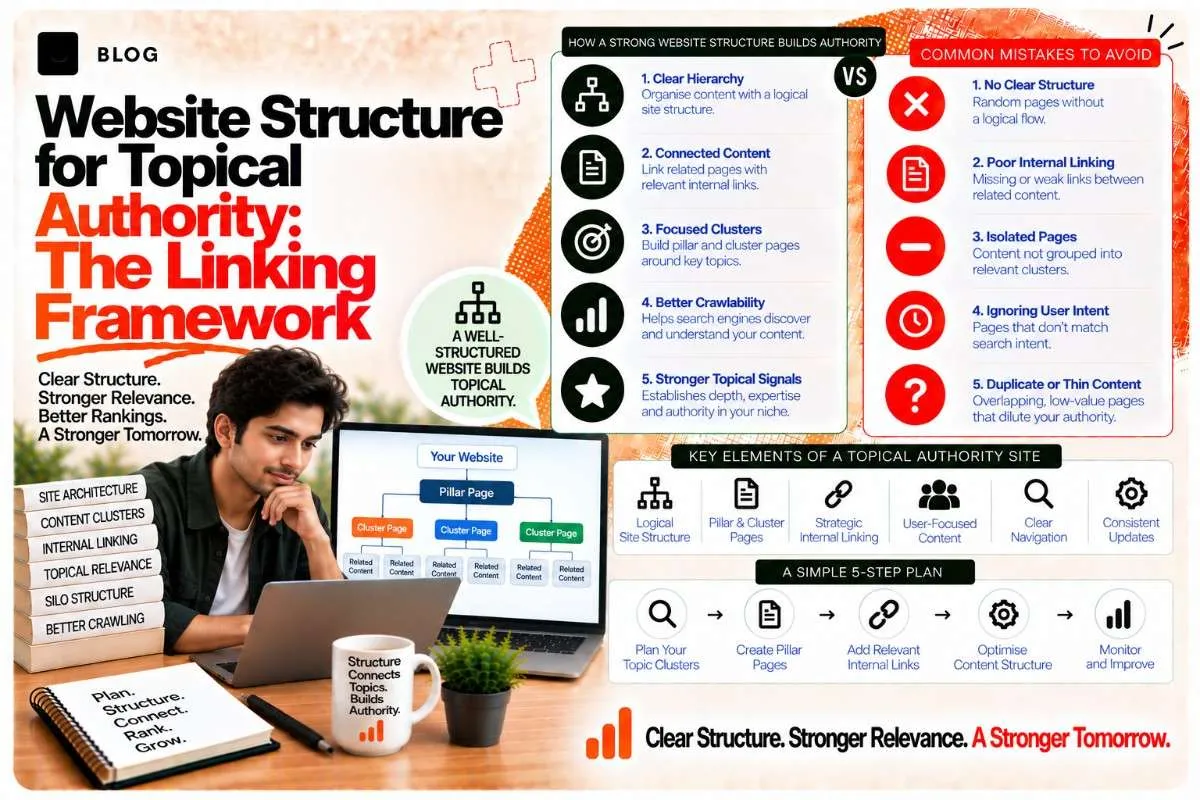
Website Structure for Topical Authority: The Linking Framework
You've written 20 posts on SEO, AEO, and GEO. They're good posts. They're internally linked. But does your site structure actually signal to Google and AI systems that you're an authority on these topics?
Not necessarily. Structure matters as much as content. A haphazard linking structure — posts scattered across your site with random cross-links — signals chaos, not expertise. A deliberate structure — where content is organized hierarchically, linked strategically, and positioned in relation to each other — signals that you've thought about the topic deeply.
This is the difference between having content about a topic and being structured like an authority on it.
How site structure signals topical authority
When Google or an AI system crawls your site, they're not just reading individual posts. They're mapping the relationships between posts. They're asking: "How are these posts connected? Do they build on each other? Is there a hierarchy?"
A well-structured site answers these questions clearly. A poorly structured site leaves them confused.
Consider two sites, each with 20 SEO posts:
Site A (scattered):
- Posts are published chronologically, not topically
- Internal links are random ("related posts" sidebar, no clear logic)
- No clear hierarchy (pillar posts don't exist, all posts feel equal)
- Breadcrumbs don't reflect topic relationships
- Navigation doesn't group related content
Google and AI systems read this as: "This person writes about SEO a lot, but they don't have a coherent framework."
Site B (structured):
- Posts are organized by topic cluster (on-page SEO, technical SEO, local SEO, etc.)
- A pillar post introduces each cluster
- Cluster posts link back to the pillar and to each other
- Breadcrumbs show the topic hierarchy
- Navigation groups related content visibly
Google and AI systems read this as: "This person has thought deeply about how SEO breaks down into subtopics. They understand the relationships between ideas. They're an authority."
Site B gets higher topical authority signals from the same number of posts, just by structuring them better.
The core elements of a topical authority structure
1. Pillar posts: the foundation of each cluster
A pillar post introduces a broad topic and links to all subtopics within that cluster.
Example pillar post: "SEO/AEO/GEO: The Complete Framework"
- Explains what SEO, AEO, and GEO are
- How they relate to each other
- The major subtopics within each
- Links to 10–15 cluster posts that dive deeper
The pillar is the hub. Everything else in the cluster points back to it or to each other.
Best practices for pillar posts:
- 2,500–4,000 words (substantial enough to cover the whole topic)
- Clear internal links to each subtopic (1–2 sentences introducing each, then a link)
- Uses h2 and h3 headings that match the cluster posts you link to
- Lives at a clean URL (e.g., /seo-aeo-geo/ or /topics/seo-aeo-geo/)
- Is your primary ranking target for broad, cluster-level keywords
2. Cluster posts: depth on subtopics
Cluster posts are 1,500–2,500 word posts that dive deep into a specific subtopic within a pillar's cluster.
Example cluster posts under the SEO/AEO/GEO pillar:
- "Technical SEO Checklist: Schema Markup, Crawlability, Core Web Vitals"
- "On-Page SEO: Title Tags, Meta Descriptions, Headers, Internal Links"
- "Entity SEO Playbook: Building Brand Authority for AI Search"
Each cluster post:
- Covers one specific subtopic in depth
- Links back to the pillar post in the first 100 words
- Links to 2–3 related cluster posts (if relevant)
- Uses a clean URL that reflects the subtopic (e.g., /technical-seo-checklist/)
- Targets specific, lower-competition keywords within the broader cluster
3. Supporting posts: niche angles and long-tail variations
Supporting posts are optional but powerful. They're posts that cover very specific angles or long-tail keywords within a cluster, without being core cluster posts.
Example supporting posts:
- "Title Tags for AI Search: What Changed Since 2024"
- "Schema Markup That Helps AI Cite You"
- "Internal Linking Strategy for Topical Authority"
These posts:
- Link back to a relevant cluster post
- May link to the pillar post if directly relevant
- Are more niche/long-tail than the main cluster posts
- Help capture specific, lower-volume keywords
- Support the authority of the cluster without being essential
4. Internal linking: the connective tissue
Internal links are how you signal relationships between posts.
Pillar-to-cluster links:
- In the pillar post, link to each cluster post once in a natural, contextual way
- Use descriptive anchor text that indicates what the linked post covers
- Link early (first 30% of the pillar)
Example:
"To understand how to actually build topical authority, see our guide on Building Topical Authority Clusters."
Cluster-to-cluster links:
- Link between related cluster posts when one naturally references another
- Don't force links; they should add value to the reader
- Use descriptive anchor text
- Keep it to 2–3 related posts per post (more clutters the reader experience)
Cluster-to-supporting links:
- In a cluster post, link to supporting posts that cover specific angles or details
- In a supporting post, link back to the broader cluster post it supports
Example:
"For a deeper dive into title tag optimization specifically for AI search, see Title Tags for AI Search."
Breadcrumb hierarchy:
- Use breadcrumbs that reflect topic relationships
- Example: Home > SEO/AEO/GEO > Technical SEO > Schema Markup
- This visually shows the hierarchy to both users and crawlers
5. Navigation and site architecture
Your site's navigation should reflect your topical clusters, not just pages.
Ideal navigation structure:
- Home
- Services (if applicable)
- Blog
- SEO/AEO/GEO (pillar/cluster overview)
- Local SEO
- Technical SEO
- (etc. for each pillar)
- Resources
- About/Contact
Within each cluster in navigation, you might list:
- The pillar post
- Top 2–3 cluster posts
- "View all posts in this cluster" link
This makes it obvious to crawlers and users that these posts are related.
The topical authority audit: how to assess your current structure
1. Map your clusters — list all your blog posts and group them by topic. What natural clusters emerge?
2. Identify your pillar posts — which posts are comprehensive overviews that could serve as hubs?
3. Check pillar-to-cluster linking — does each pillar link to its cluster posts? Are the links descriptive?
4. Check cluster-to-cluster linking — do related cluster posts link to each other when relevant?
5. Review navigation — does your site's navigation reflect your topic clusters, or does it just list pages?
6. Check breadcrumbs — do breadcrumbs show topic hierarchy, or are they generic?
7. Audit orphaned posts — are any posts isolated (no links to them, no links from them)? These need connecting.
8. Test crawler perspective — use Screaming Frog or a similar tool to map internal link structure. Do the relationships between posts make sense visually?
Common topical authority structure mistakes
Don't create pillar posts without cluster support.
A pillar post with only 3–4 cluster posts signals incomplete authority. Aim for at least 8–10 cluster posts per pillar before promoting it as a pillar.
Don't link every post to every other post.
Excessive internal linking confuses both users and crawlers. The link structure should reflect actual relationships, not just maximize link count.
Don't bury cluster posts in your navigation.
If cluster posts are hard to find in your navigation, they're not signaling cluster relationships clearly. Make them visible.
Don't use generic anchor text in pillar-to-cluster links.
"Click here" or "read more" doesn't signal topic relationships. Use descriptive anchors: "Learn how to implement Entity SEO in your strategy."
Don't mix unrelated content in a cluster.
A "Content Writing" cluster shouldn't include "Logo Design" posts. Keep clusters focused and coherent.
Don't forget breadcrumbs.
Breadcrumbs are a visual and structural signal to both crawlers and users that posts belong to a topic cluster. Without them, the structure isn't obvious.
The technical implementation: how to set up clusters in practice
For WordPress:
- Create a category or custom taxonomy for each cluster
- Assign posts to the appropriate cluster
- Install a plugin like Yoast SEO or Rank Math that can auto-generate cluster links
- Create a pillar post template that includes a section linking to all cluster posts
- Use a breadcrumb plugin that reflects category/cluster hierarchy
For other platforms:
- Organize posts into folders or sections that reflect clusters
- Create a linking standard (every cluster post links back to its pillar in the first 100 words)
- Use breadcrumb generators or manual breadcrumbs that show hierarchy
- Create a "related posts" section based on cluster membership, not just similarity
For custom sites:
- Define your URL structure to reflect clusters (e.g., /topics/seo/technical-seo/)
- Implement schema markup that reflects parent/child relationships
- Auto-generate internal links based on cluster taxonomy
- Implement breadcrumbs that show the full hierarchy
Frequently asked questions
Aim for at least 8–10 high-quality cluster posts before promoting a pillar post heavily. This signals that you've covered the topic comprehensively. With fewer than 5 cluster posts, a pillar post isn't yet effective.
Not necessarily. Some posts (news, announcements, one-off topics) don't fit a cluster. But your core authority-building content should be organized into clusters. Aim for 70–80% of your posts to be part of deliberate clusters.
Yes, indirectly. A well-structured cluster tells Google that you have comprehensive, organized content on a topic. This can help you rank for the pillar keyword and cluster keywords, and it increases the likelihood that you rank for multiple variations.
Check your Google Search Console and Google Analytics for cluster-level metrics: are pillar post rankings improving? Are cluster posts driving traffic to each other? Are conversion rates better for cluster pages? These signals indicate that your structure is working.
You can still apply cluster thinking to service pages. Group related services (SEO, AEO, GEO) under a single comprehensive service hub page, and link to service-specific pages from the hub. This signals that the services are related and you understand their connections.
You don't need to do it all at once. Start with your highest-traffic topic area, organize it into a pillar-cluster structure, and expand from there. Small, incremental improvements are better than attempting a massive site reorganization all at once.
Ready to build what's next?
Tell us where you're headed. We'll come back with a plan to get there.
Book an intro call