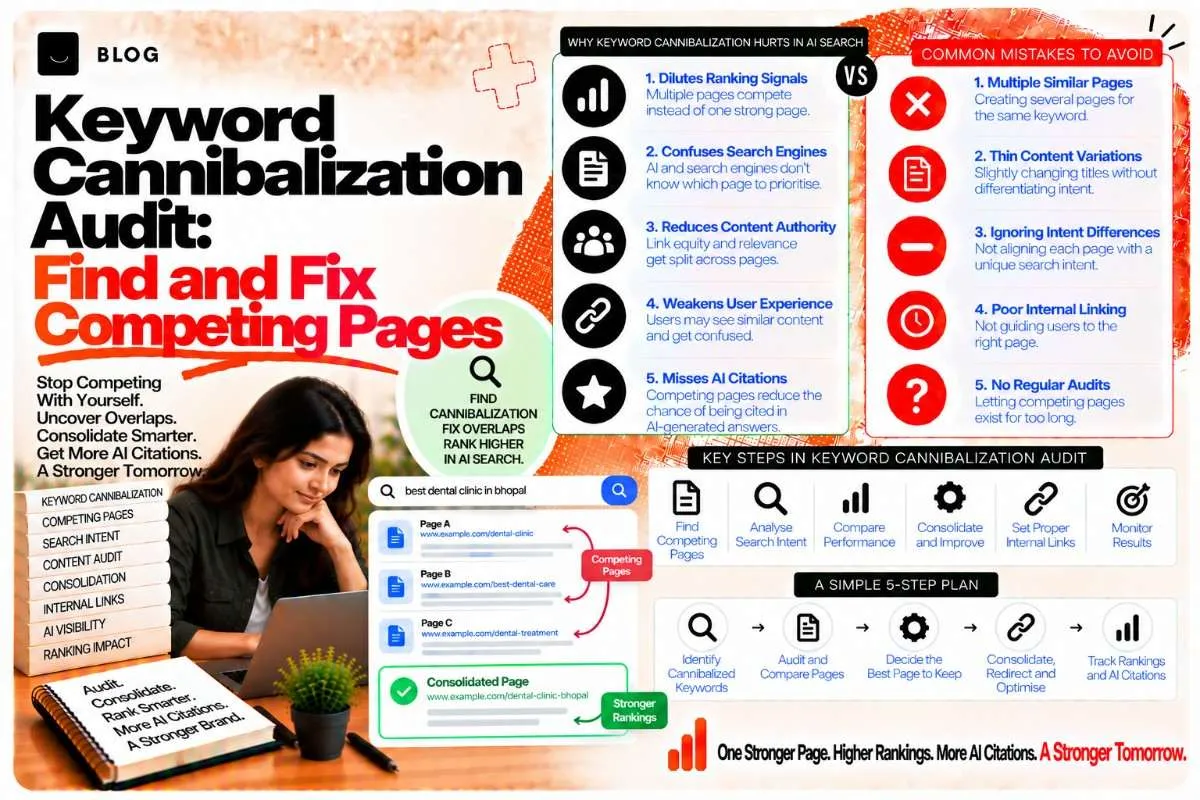
Keyword Cannibalization Audit: Find and Fix Competing Pages
You publish a guide on a topic. A year later, you publish another post on the same topic, with a different title and a fresh angle. Then a third. Each post made sense when it was written. Together, they split the signal that one strong page should have carried.
This is keyword cannibalization. When two or more pages on your own site compete for the same query, or for queries with the same underlying intent, search engines have to choose between them. They often alternate, rank one page and then another, or settle on a weaker page than the one you would have chosen. AI systems face the same ambiguity: when your domain has several pages that answer the same question, the signal about which one is authoritative becomes blurred.
The fix is not to delete pages by reflex. It is to audit your site, decide what each overlapping page should do, and act on that decision. This guide shows how.
What cannibalization looks like in practice
Cannibalization is easy to miss, because each page on its own looks reasonable. The symptoms usually appear in aggregate:
- Rankings that swap. A query shows one URL on one day and a different URL the next, or both URLs sit low in the results.
- A weaker page ranking above a stronger one. The page you would expect to rank for a query sits below an older or less complete article.
- Impressions split across URLs. Two pages each get modest impressions for the same query, where one page would have earned more.
- Several pages with near-identical titles. Titles differ by a word or two, such as "SEO Checklist," "SEO Checklist 2026," and "Ultimate SEO Checklist."
- Overlapping headings and sections. The same subtopics appear across multiple posts with slightly different wording.
Cannibalization is not always a problem. Two pages can target related queries that users genuinely want answered separately. The audit is about deciding which overlaps are harmful.
Two kinds of overlap to distinguish
Before fixing anything, separate two kinds of overlap.
Keyword overlap. Two pages target the same exact query. This is the clearest case.
Intent overlap. Two pages target different keywords that users search for in the same situation, and they would both be the right answer. For example, "how much does SEO cost" and "SEO pricing for small business" are different strings with the same intent. A user wants the same answer either way.
Intent overlap is the more common and more subtle problem, and it is the one most audits miss if they only compare keyword lists. Check both.
Step 1: Export your query data
Start with the search data you already have.
Export the Performance report from Google Search Console for the last 6 to 12 months, with two dimensions: query and page. This gives you every query each URL has appeared for, with impressions, clicks, and average position.
Filter for queries that appear with two or more different URLs. These are your candidates for keyword-level cannibalization. Sort by impressions, so you focus on the queries that matter most.
Also export a list of your indexable URLs, with titles and primary topics, from your CMS or a crawler such as Screaming Frog. You need this to spot intent overlap, which will not show up in query data alone.
Step 2: Identify the competing pages for each candidate query
For each query that shows up under multiple URLs, record:
- The query itself and its total impressions.
- Each competing URL, with its impressions, clicks, and average position for that query.
- Which URL is currently ranking best, and which you believe should rank best.
- The page's publish date and last updated date.
Look for the pattern. In many cases, one URL has most of the impressions and the others have a small share. Those small-share pages are the most likely candidates for consolidation.
Step 3: Check intent overlap with a manual search
Query data cannot show you pages that compete for intent without sharing exact queries. For those, search the topic yourself.
Pick each core topic on your site and search it in Google. Note:
- Which of your URLs appear in the results.
- Whether the results show the same answer type (a guide, a list, a comparison).
- Whether two of your pages appear for slightly different phrasings of the same question.
Then ask an AI system the same question. Note whether it cites one of your pages, both, or neither. If both of your pages are relevant and it cites neither, the overlap is hurting your visibility.
Step 4: Decide the action for each overlapping group
Once you have a group of competing pages, choose one of four actions.
Consolidate. Merge the pages into one stronger page, keep the URL of the strongest one, and redirect the others to it. Use this when the pages cover the same question and neither is clearly better than the other.
Differentiate. Keep both pages but change their focus so each answers a distinct question. Rewrite titles, headings, and introductions so the intent of each is clear. Use this when the pages serve genuinely different users, such as a beginner guide and an advanced technical checklist on the same subject.
Canonicalize. Keep the page you want to rank and add a canonical tag on the other page pointing to it. Use this when the duplicate page must stay live for a functional reason, such as a filtered view, a print version, or a regional variant of the same content. Canonicals are a hint, not a directive, so they work best when the duplicate is genuinely equivalent.
Noindex or remove. Use this when a page should not appear in search results at all, such as a thin page with no unique value. Removal with a redirect is covered in more detail in the content pruning post.
The most common mistake is choosing to differentiate pages that are really the same. If you find yourself writing two introductions that answer the same question, the pages should be consolidated.
Step 5: Choose the page to keep
When consolidating, the page you keep should be the one with the strongest combination of signals:
- The most impressions and clicks for the target query.
- The most external backlinks.
- The most internal links pointing to it.
- The most complete, accurate, and recently updated content.
- The cleanest URL and the best existing ranking position.
Do not automatically keep the oldest page. An older article with thin content and a messy URL is often a weaker choice than a newer, more complete one. Keep the page that best serves the query, then bring the best sections of the others into it.
Step 6: Carry over the useful parts before redirecting
When you consolidate, move the strongest sections, examples, and data from the pages you are retiring into the page you keep. Check that the merged page answers every question the retired pages answered, including questions that drew traffic. A redirect to a page that no longer covers the question will send users to the wrong place and lose their engagement.
After the merge, set up 301 redirects from each retired URL to the page you kept. Point each redirect directly at the final destination, not through a chain of other redirects.
Update internal links that point to the retired URLs, so they go straight to the kept page. Old redirected links work, but direct links are cleaner and avoid unnecessary hops.
Step 7: Fix the internal link signals
Internal links tell search engines which page you consider important for a topic. When two pages compete, your internal links may be sending mixed messages.
For each topic group:
- Make sure the page you want to rank is linked from related content on your site, with descriptive anchor text that matches its topic.
- Reduce links from other pages that point to the weaker competing page, or update them to point to the kept page.
- Avoid using the same anchor text to point to two different pages on the same topic. Identical anchors send an ambiguous signal.
This step is the one that often produces the fastest changes, because it corrects the signal without changing any content.
Step 8: Measure the result
After you consolidate, differentiate, or canonicalize, monitor the affected queries for 60 to 90 days.
Track:
- Impressions and clicks for the target query on the kept page. They should rise as the signal concentrates.
- The number of URLs appearing for the query in Search Console. It should drop to one.
- Average position for the target query on the kept page.
- Index status for the retired URLs, which should move to redirected or removed.
- AI citation checks, asking the same questions you audited and noting which of your pages, if any, appear in responses.
Expect some turbulence in the first few weeks. A stable result usually takes two to three months to show.
What cannibalization audits cannot fix
An audit will not fix thin content. If the overlapping pages are all weak, consolidating them produces one weak page. Improve the content as part of the process.
An audit will not fix a site with no clear topic focus. If you have not decided which topics matter most, every overlap looks equally important. Set priorities first.
And an audit will not replace the planning step. The best defence against cannibalization is to check existing coverage before writing a new page. The search intent mapping post covers that planning step.
Common cannibalization audit mistakes to avoid
Treating every overlap as a problem. Related pages that serve different users are not cannibalizing each other. Decide by intent, not by topic similarity alone.
Deleting the wrong page. Keeping the page with the most history, rather than the most complete content, often leaves you with a weaker result.
Redirecting to the homepage. A redirect to an unrelated page loses the signal and the user. Redirect to the closest matching page.
Consolidating without carrying content over. The merged page must cover the questions the retired pages answered.
Ignoring internal links. If your menus and related-post widgets still point to the weaker page, the signal will keep splitting.
Auditing once and never again. New overlaps appear as a site grows. Schedule a review every six months.
Frequently asked questions
No. Google does not penalise a site for having overlapping pages in the way it penalises manipulation. The problem is that overlap splits signals, so the result is usually weaker rankings than a single strong page would earn.
There is no fixed number. The test is whether the pages answer the same question for the same user. Two pages with genuinely different angles can coexist. Three near-identical posts on one question should be consolidated.
Use redirects when the retired page should disappear and its users should land on the kept page. Use canonical tags when the duplicate must stay live for a functional reason. Redirects are the stronger signal when the pages are truly the same.
Sometimes, if the pages are genuinely different in purpose. If they answer the same question, changing titles will not resolve the overlap, and consolidation is the better fix.
It can. When several of your pages answer the same question, AI systems have to choose between them, and the signal about which page is authoritative becomes less clear. Consolidating into one strong page gives them an obvious source.
Start with the Search Console query-and-page export, filtered for queries with multiple URLs. For intent overlap, use a crawler to list titles and primary topics, then group them by theme. Large sites benefit from a spreadsheet pass before any manual review.
Ready to build what's next?
Tell us where you're headed. We'll come back with a plan to get there.
Book an intro call