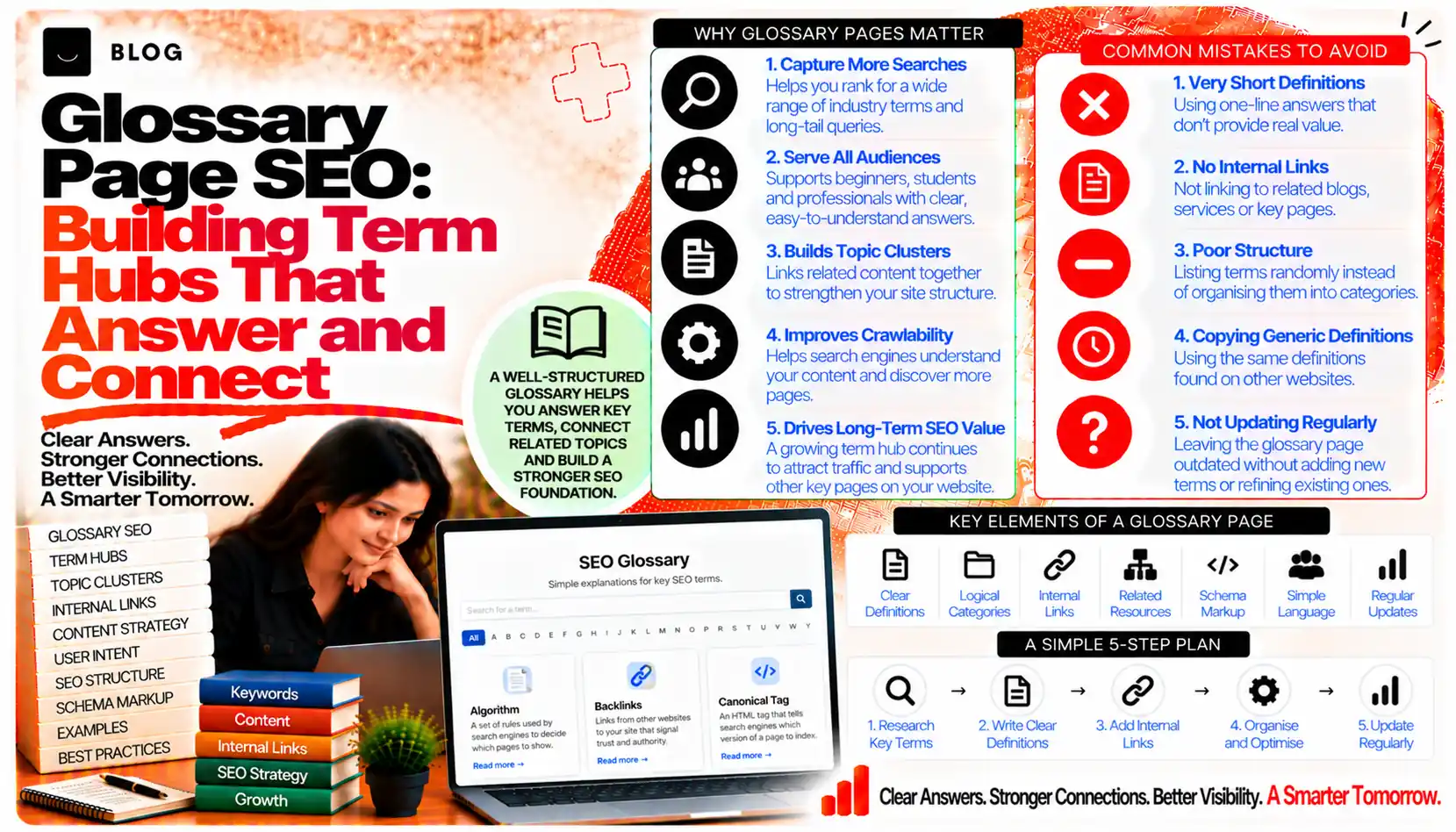
Glossary Page SEO: Building Term Hubs That Answer and Connect
Many readers begin their research with a definition. They want to know what a term means before they read a guide, compare options or ask a question. Search engines and AI systems also look for clear, stable definitions when they explain a topic. A glossary gives a site a place to answer those questions directly, and to show that it understands the vocabulary of its field.
Most glossaries underperform. They are long single pages with alphabetical lists, thin entries and no links to the content that would help the reader next. Or they are scattered across a site, with the same term defined three different ways. Done well, a glossary is a structured hub: each term has its own page, each definition is consistent with the rest of the site, and each page leads the reader to a deeper guide.
This guide covers when a glossary is worth building, how to structure the hub and its term pages, how to handle terms with several meanings, and how to keep the vocabulary consistent over time.
What a glossary can and cannot do
A well-built glossary can capture searches for specific terms, help readers who are new to a subject, and give search engines and AI systems clear, citable definitions. It can also show topical depth, because a comprehensive set of terms signals that the site covers its subject thoroughly.
A glossary cannot rank for terms the site has no authority on, and it cannot replace a full guide. A definition of a term that the site does not explain in depth is a thin page, however tidy it looks.
Step 1: Decide whether the site needs a glossary
A glossary suits a site whose subject uses specialised vocabulary that readers do not all know, and where people search for the definitions. It is less useful for a site with a narrow product range or a vocabulary that is settled and familiar.
Ask:
- Do readers search for definitions of terms in our subject?
- Do our guides use terms that new readers would find unclear?
- Could a definition page lead the reader to a deeper guide we already have?
If the answers are mostly no, a glossary may add little. If the answers are yes, the next step is to choose terms with care.
Step 2: Choose terms that have real demand and real depth
Start from the questions your audience asks. Search demand for "what is" and "meaning of" queries shows which terms people look up. Your own search data, support tickets and sales conversations show which terms cause confusion.
For each candidate term, check three things:
- Demand: people search for it, or it appears often in your content
- Depth: you can write a definition and explain how the term is used, with examples, and link to a guide that goes further
- Accuracy: you can define it correctly and consistently with the field's usage
Drop terms you cannot define well. A glossary of fifty short, shallow entries is less useful than twenty solid ones.
Step 3: Structure the hub and the term pages
A glossary works best as a hub with individual term pages. The hub lists and groups the terms, and each term has its own page with a clear URL.
The hub page should:
- Explain what the glossary covers and who it is for
- Group terms by theme, so readers can browse related vocabulary
- Link to every term page, with a short description for each
- Offer a clear way to find a term, such as an alphabetical index or a search
Each term page should be structured around a single term:
- An H1 that names the term, such as "Canonical Tag"
- A short definition in the first paragraph, stated plainly
- An explanation of how the term is used, with an example from the subject
- Related terms, linked to their own pages
- A link to a deeper guide where the term is covered in depth
- Common confusions, where the term is often mixed up with a similar one
Keep each term page focused. A page should define one term well, not several at once.
Step 4: Write definitions that stand on their own
A definition is often read out of context, by someone who arrived from a search or from an AI answer. It should make sense without the rest of the page. Open with the definition itself, in one or two clear sentences, then add the detail.
Compare:
- Weak: "This is an important concept that many people find useful to understand."
- Good: "A canonical tag tells search engines which version of a page is the preferred one when several URLs show similar content."
The second version states what the term is, in plain language, before explaining its use. It is more accurate, more citable and more useful to the reader.
Step 5: Handle terms with several meanings
Many terms have more than one meaning, depending on the field or the context. A term such as "index" means different things to a search engineer, a database administrator and a reader of a book. Where your subject uses a term in a particular sense, define that sense first.
Options include:
- Stating the primary meaning in the subject, then noting other meanings briefly
- Creating separate term pages for meanings that are genuinely distinct and have separate search demand
- Disambiguating in the definition, so the reader knows which sense applies
Be careful not to create near-duplicate pages for one term with minor variations. If two pages would define the same thing, merge them.
Step 6: Link terms to the guides that matter
A term page is most valuable when it leads somewhere. Link each term to the guide that explains it fully, and to related terms that help the reader build understanding.
Link with purpose:
- From the term to the deeper guide, with descriptive anchor text
- From the guide back to the term where the term first appears, so the vocabulary connects both ways
- Between related terms, where a reader is likely to need the next one
The internal linking strategy post covers how link structure builds topical relationships, which is what makes a glossary useful beyond its individual pages.
Step 7: Keep definitions consistent across the site
Inconsistent definitions confuse readers and weaken the site's authority. If one page defines a term one way and a glossary entry defines it another way, the reader does not know which is right.
To keep definitions consistent:
- Keep a master list of terms and their approved definitions
- Review existing guides for terms they use, and align the wording where needed
- Assign an owner to the glossary, responsible for new terms and changes
- Record the date each definition was last reviewed
The content freshness post covers when an update is meaningful. For a glossary, a change in a term's accepted meaning is a meaningful update, and it should be applied across the site.
Step 8: Mark up definitions carefully
Structured data can help search engines understand definitional content, but its value depends on accuracy and on matching what is visible on the page. Use markup only where it reflects the content, and follow current guidance on which features are displayed. Do not rely on markup to produce a result, because display is at the search engine's discretion.
The advanced schema post covers the principle of matching markup to visible content, which applies here.
Step 9: Keep the glossary current
Terms change. New ones appear, older ones fall out of use, and accepted meanings shift. A glossary that is never reviewed will become inaccurate.
Set a schedule:
- Add new terms as they arise in your content and in customer questions
- Review definitions at least once a year, or when the field changes
- Retire terms that no longer have demand or relevance, with a redirect to a related term where one exists
- Check links to deeper guides, since they can break as the site changes
What a glossary cannot do
It cannot replace a thorough guide on a topic. It cannot rank for terms the site has no authority on. And it cannot make a site authoritative on its own, because a glossary reflects the depth of the content behind it. The strongest glossaries grow out of real expertise and link readers to it.
Common glossary mistakes to avoid
Building one long page of thin entries. Each term needs a page with enough substance to stand on its own.
Defining terms you cannot explain in depth. Shallow definitions do not help readers or search engines.
Creating near-duplicate pages for variant terms. Merge them instead.
Letting definitions drift apart across the site. Keep one approved definition for each term.
Leaving the glossary unlinked. Terms without links to guides lead nowhere.
Never reviewing the glossary. Outdated definitions damage trust.
Frequently asked questions
Not always. It helps when readers search for definitions of terms in your subject, and when your guides use vocabulary that new readers find unclear. It is not a requirement for ranking.
As many as you can define well and link to real content. A focused set of strong entries is more useful than a long list of thin ones.
Usually, yes, for terms with enough demand and depth. Terms with little demand can be grouped on the hub page instead.
A featured snippet is a format for answering one query in a search result. A glossary is a site-level structure of term pages, linked together and kept consistent. The two can work together.
State the meaning relevant to your subject first, and note other senses briefly. Create separate pages only where the meanings have distinct demand.
It can make definitions clear and stable, which helps any system that reads the page. Behaviour varies by system, so treat clarity as the goal rather than a particular AI outcome.
Ready to build what's next?
Tell us where you're headed. We'll come back with a plan to get there.
Book an intro call