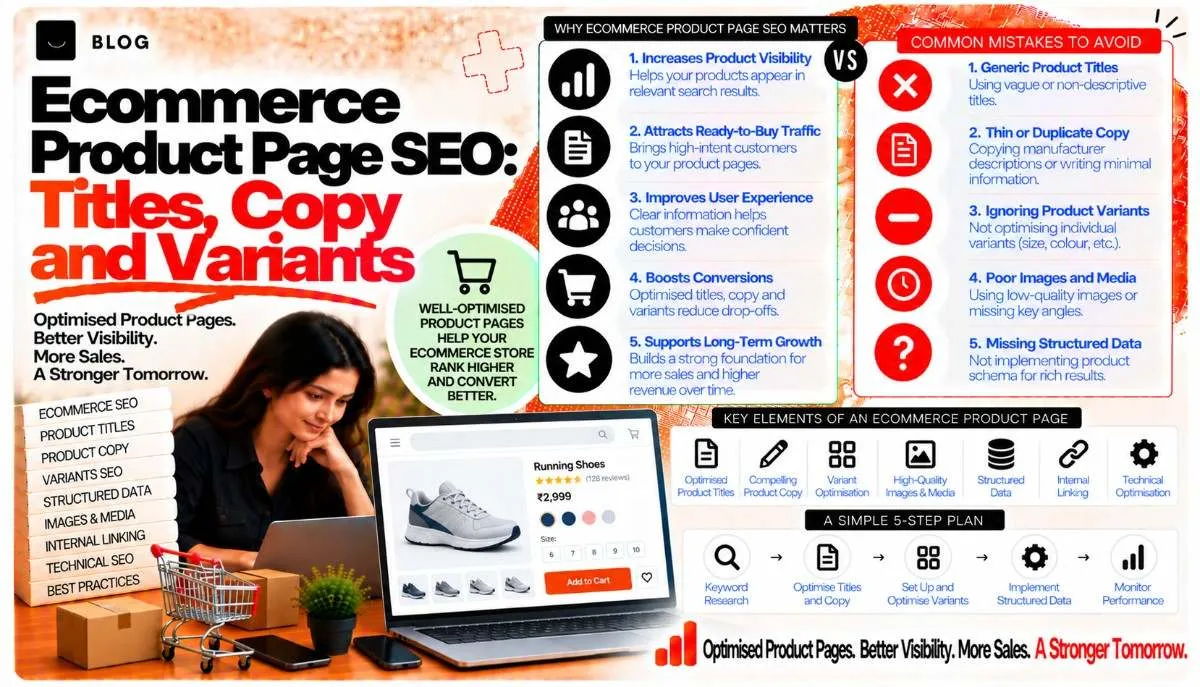
Ecommerce Product Page SEO: Titles, Copy and Variants
A product page has one job in search: to match a shopper who is ready to buy with the item they are looking for, and to make the purchase easy once they arrive. Many stores undermine that job without noticing. Titles are a model number and nothing else. Descriptions are copied from the manufacturer and shared with dozens of other retailers. A single product appears at five URLs because of size and colour options. The result is pages that compete with each other, say little that is useful, and struggle to rank for the searches that matter.
Product page SEO is the work of making each product page clearly about one thing, useful to the buyer, and distinct from the others in the catalogue. It is closer to editorial and merchandising work than to technical tuning, although the technical side matters too.
This guide covers titles, product copy, variant handling, duplicate content, and the signals that help a product page earn its place in search.
What product page SEO can and cannot do
Good product pages help search engines understand what is for sale, help shoppers decide, and reduce the pages that compete for the same query. They can bring traffic from high-intent searches, which often convert well. They cannot make a product sell if the price, stock or delivery is uncompetitive, and they cannot fix a store whose category structure is confused.
Product pages also depend on the wider site. Category pages, navigation and crawl control all shape how product pages are found, as the pagination and faceted navigation post explains.
Step 1: Audit the catalogue before editing anything
Start with a clear view of what exists. Export every product URL with its title, meta description, H1, description word count, status, and whether it is indexed. Add the Search Console clicks and impressions for each page over the last 12 months.
Look for:
- Products with no traffic and no sales, which may need improvement or removal
- Products with impressions but no clicks, which often have weak titles or snippets
- Products with very short or copied descriptions, shared with other retailers
- Multiple URLs for the same product, created by variants or parameters
This audit tells you where effort will pay off. Improving the top 50 products by demand usually matters more than rewriting the whole catalogue at once.
Step 2: Write titles that match buying queries
A product title should say what the item is, in the words a shopper would use, followed by the detail that distinguishes it. Brand, model, key attribute and size or colour are the usual elements, in an order that reads naturally.
Compare:
- Weak: Product 4821 | Shop Online
- Weak: Cotton Kurta | Cotton Kurta Men | Kurta Online | Best Kurta
- Good: Men's Cotton Straight Kurta, Navy Blue, Regular Fit
The third title is specific, reads well in the snippet, and matches the way a shopper describes the item. Avoid stacking keywords, because it makes the snippet harder to read and can look spammy.
Keep titles within the length that displays well, and check the rendered snippet on mobile. The title tags post covers the wider principles for titles and descriptions.
Step 3: Write product copy that helps the buyer decide
A product description should answer the questions a buyer has before they buy: what it is, what it is made of, how it fits or works, what is included, how to care for it, and why it is worth choosing. Write for the shopper, and let the keywords appear where they fit the description naturally.
A useful structure:
- An opening paragraph that says what the product is, who it is for and its main benefit
- Specifications as a clear list: materials, dimensions, weight, compatibility, certifications
- Use and fit guidance, such as sizing notes, setup steps or care instructions
- What is in the box or what the purchase includes
- Answers to common questions, drawn from customer service enquiries
Avoid copying the manufacturer's text word for word. Many retailers use identical copy, so the product page has nothing distinct to offer search engines or shoppers. Rewrite the core description in your own words, and add the local details that matter, such as delivery times or return conditions.
Step 4: Decide how variants are handled
Variants are the most common source of duplicate product pages. A kurta in four sizes and three colours can produce twelve URLs, each with near-identical content. Decide the structure before the catalogue grows.
There are two common approaches:
- One canonical product page for the main product, with variant choices on the same page. The variant selector changes the price, image or availability without creating a new address. Canonical tags point to the main page.
- Separate pages for variants that have distinct demand, such as a colour that is searched for independently, or a size range that needs its own description. Each page then needs unique content, not a swap of one word.
Use separate URLs only where the variant has enough distinct search demand and content to justify it. Otherwise, keep the variants on one page and let the selector do the work.
Check that variant URLs with parameters, such as colour or size in the query string, either canonicalise to the main page or are blocked from indexing where appropriate. The pagination and faceted navigation post covers the crawl-control side of this decision.
Step 5: Control duplicate and near-duplicate pages
Duplicate content on a store comes from several sources: variants, sorting and filter parameters, tracking codes, supplier feeds that create extra URLs, and the same product filed under multiple categories.
To control it:
- Set a canonical tag on every product page that points to its preferred address
- Keep one preferred URL for each product, and use consistent internal links to it
- Block or noindex parameter pages that add no unique value, such as sort orders
- Remove or consolidate discontinued products with a redirect to the closest current equivalent, or a 410 where there is no equivalent
Search engines may choose a different canonical if signals conflict, so keep the canonical, internal links, sitemap and redirects aligned.
Step 6: Treat out-of-stock products deliberately
Out-of-stock products create a dilemma. Deleting the page loses any traffic and links it has built. Leaving it live without explanation frustrates shoppers and wastes crawl budget.
Options include:
- Keep the page live, with a clear "out of stock" message, the expected return date if known, and links to similar products
- Redirect to a close substitute where the product is replaced by a successor model
- Return a 404 or 410 where the product is permanently gone and there is no equivalent, after checking whether it earns links or traffic
The content pruning post covers the broader process for deciding what to keep and what to remove.
Step 7: Strengthen the signals that help a product page
Several elements support the product page beyond the copy itself.
- Images should be clear, correctly sized and properly described. The image SEO post covers alt text, file names and formats.
- Customer reviews add unique content and trust, when they are genuine and visible. Do not generate fake reviews, and do not mark up reviews in ways that break platform rules.
- Structured data for products can help search engines read price, availability and reviews. Mark up only information that is accurate and visible on the page, and check the current guidance on which rich result features are displayed.
- Clear internal links from related products and category pages help shoppers and search engines find the product.
- Page performance matters for buyers. Slow product pages lose sales, and the Core Web Vitals post covers how to measure and improve loading.
Step 8: Measure what the product page is for
Judge product pages on the outcomes that matter to the business: clicks, add-to-cart rate, conversion rate and revenue. Search Console shows which queries bring traffic to each product, which helps decide where to improve copy. GA4 shows what those visitors do next.
Look for patterns:
- Pages that get impressions but few clicks need better titles and snippets
- Pages that get clicks but few purchases may need better descriptions, images, pricing clarity or delivery information
- Pages that rank for a query but attract the wrong buyers may need clearer scope in the copy
Test changes one at a time where possible, and record the date of each change, so the effect can be traced.
What product page SEO cannot do
It cannot fix an uncompetitive price or a poor delivery offer. It cannot replace category pages that organise the catalogue well, and it cannot rescue a product that no one is searching for. Product page work improves the page's chance to rank and convert. It does not guarantee either.
Common product page mistakes to avoid
Copying manufacturer descriptions. Many retailers share identical text, so the page has no distinct value.
Creating a URL for every variant. This produces duplicate pages that compete with each other.
Deleting out-of-stock pages without a plan. Lost pages lose their links and traffic.
Keyword-stuffed titles. They read poorly in the snippet and can look spammy.
Marking up information the page does not show. Structured data should match what the shopper sees.
Ignoring mobile. Most product browsing happens on phones, so check the layout and the buying path on a small screen.
Frequently asked questions
Ideally, yes, for the products that matter. Prioritise the best-selling and most-searched products first, and improve the rest over time.
Usually one page, with a variant selector, unless a colour has enough distinct search demand and content to justify its own page.
Long enough to answer the buyer's questions, and no longer. A short product may need only a few clear paragraphs and a specification list. A complex product may need more.
Genuine reviews add unique, useful content and trust. Do not create fake reviews, and do not present reviews in ways that mislead.
Redirect to the closest current equivalent where one exists. Where none exists, consider a 410 or a consolidated category page, after checking whether the old page earns links or traffic.
No. Product markup helps search engines understand the page, but rich result display is at their discretion and depends on the page meeting current guidelines.
Ready to build what's next?
Tell us where you're headed. We'll come back with a plan to get there.
Book an intro call