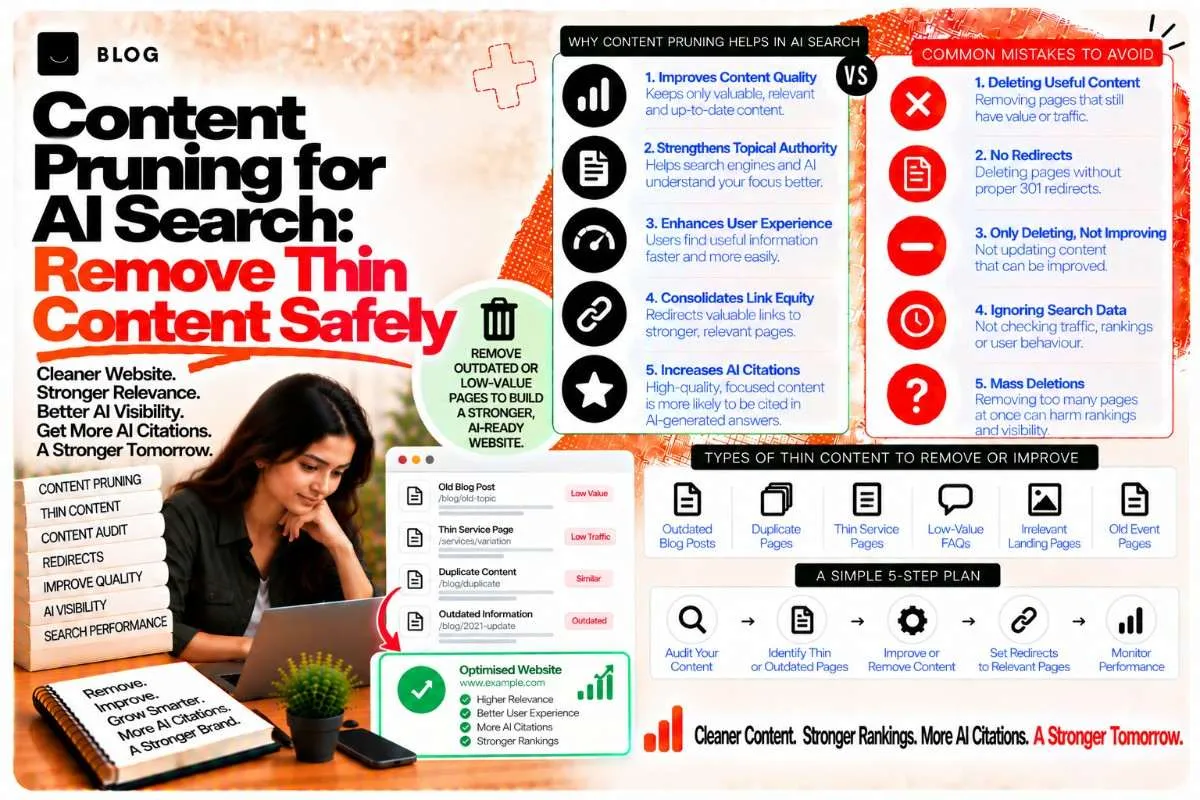
Content Pruning for AI Search: Remove Thin Content Safely
Most content libraries grow in one direction. Every quarter adds posts, and very few get removed. After two or three years, a site often has dozens of pages that attract no clicks, answer nothing well, and repeat points made elsewhere on the same domain.
Those pages cost you more than they seem to. Google has to crawl them, decide how much they matter, and weigh them against your stronger pages. AI systems do something similar when they evaluate a domain: a site where most pages are shallow or redundant gives a blurrier signal of what it is an authority on.
Content pruning is the deliberate process of removing, merging, or redirecting weak pages so the strong ones carry the signal. Done carefully, it often produces better rankings with fewer pages. Done carelessly, it throws away traffic and links. This guide covers how to tell the difference.
What counts as thin content
Thin content is not simply short content. A 400-word page that answers a narrow question completely is fine. A 2,000-word page that repeats three other posts is thin in the sense that matters.
Thin content usually shows one or more of these patterns:
- Little unique value. The page restates information available on dozens of other sites, or repeats your own posts with new wording.
- No clear purpose. You cannot say in one sentence what question the page answers or who it is for.
- Doorway-style pages. Near-identical pages targeting slight keyword variations, such as one page per neighbourhood with the same text swapped in.
- Outdated facts with no update path. The page describes tools, prices, or rules that no longer apply, and nobody has reviewed it since.
- Zero search and zero engagement. Over 12 months, the page earns no impressions, no clicks, and no internal traffic.
Pruning is not about word count. It is about whether a page earns its place in your library.
Why pruning helps AI systems read your site
AI systems build a picture of what a domain is about from the pages it publishes. When a site contains many pages on closely related subjects that differ only slightly, the picture becomes diffuse. The system has to guess which page is the authoritative one, and it may cite a competitor whose library is tighter.
Pruning sharpens three things:
- Topical focus. Fewer, stronger pages on each subject make it clear what you are an authority on.
- Crawl efficiency. Search engines spend their crawl budget on pages that matter. On large sites, this has real effects on how quickly new and updated pages are discovered.
- Citation clarity. When one page is clearly the best answer to a question, AI systems have one obvious source to cite rather than a cluster of near-duplicates.
Pruning does not make a site "smaller for its own sake." It makes the remaining pages easier to understand.
Step 1: Build a complete content inventory
Before deciding what to remove, list every indexable URL on the site. You need the full set, not just the pages you remember writing.
Pull data from:
- Your CMS or sitemap, to get every published URL.
- Google Search Console, Performance report, exported for the last 12 months, to get impressions, clicks, and average position per page.
- Google Analytics 4, to get sessions, engaged sessions, and conversions per page.
- A crawler such as Screaming Frog, to get titles, word counts, status codes, and internal link counts.
Combine these into one sheet with one row per URL. Columns to include: URL, publish date, last updated date, word count, impressions, clicks, position, sessions, conversions, internal links in, internal links out, and primary topic.
Step 2: Score each page into one of four actions
Once the inventory is in one place, sort every page into one of four groups.
Keep and strengthen. The page gets meaningful impressions or traffic and answers its question well. Leave it alone or improve it, but do not remove it.
Update. The page covers a topic that still matters, but the content is stale, incomplete, or thin. It has some search value worth preserving. Update it rather than removing it. The freshness and dateModified work covered in our content freshness post applies here.
Merge. Two or more pages cover overlapping ground and each has modest traffic. Combine the strongest content into one page, then redirect the others to it.
Remove. The page earns almost nothing, has no unique value, has no meaningful inbound links, and cannot be usefully merged. Remove it, and handle the URL correctly (covered below).
A practical starting rule: pages with zero clicks over 12 months, fewer than two relevant internal links pointing to them, and no external backlinks are candidates for removal. Pages with external backlinks are never removed without a redirect, however weak they look.
Step 3: Check for links and conversions before anything is removed
This is the step most pruning projects skip, and it is where the real damage happens.
For every candidate page, check:
- External backlinks. Use Ahrefs, Semrush, or Search Console's Links report. A page with even one good external link should be merged or redirected, not deleted.
- Conversions. A low-traffic page can still be a key step in a buyer's journey, such as a pricing explainer or a case study. Check whether it appears in conversion paths in GA4.
- Brand or product relevance. Some pages exist for customer support or legal reasons even if they attract no search traffic. Those should stay.
Only pages with no links, no conversion value, and no operational purpose move to removal.
Step 4: Choose between redirect, merge, and removal
Each removal path has different consequences.
301 redirect sends the old URL to a closely matching new page. Use this when a merged page replaces the old one, or when another page covers the same question. The redirect passes most of the value of the old page's links to the new one.
Merge combines the best sections of two or more pages into one stronger page. Keep the URL of the page with the most links or traffic. Redirect the others to it. Check that the merged page still answers every question the original pages answered. If a section from a deleted page is missing from the new page, the redirect will look like a bad match to users.
410 Gone tells search engines a page has been permanently removed and has no replacement. Use it only when no relevant page exists to redirect to, such as a discontinued product or a campaign page with no successor. Serving a 404 also works, but 410 signals the removal more clearly.
Avoid redirecting every removed page to the homepage. Google treats mass redirects to unrelated pages as soft 404s, and users land somewhere that does not answer their question.
Step 5: Update internal links before you remove anything
Once you have decided what to remove or merge, find every internal link that points to those URLs. Update them to point at the replacement page before the redirect goes live.
Internal links from navigation menus, footers, sidebars, related-post widgets, and older articles are the most common sources of broken links after pruning. Run a crawler again after the changes and confirm that no internal links return a 404 or a redirect chain.
Redirect chains, where A redirects to B, which redirects to C, slow crawling and can lose value. Point every redirect directly at the final destination.
Step 6: Monitor the results for 90 days
Pruning effects are not instant. Search engines need time to recrawl, reprocess redirects, and re-evaluate the domain. Plan for a monitoring period of at least 90 days.
Track these signals every two to four weeks:
- Impressions and clicks for the pages that received merged content or redirects. Impressions should hold steady or rise.
- Average position for the core keywords on the strengthened pages.
- Crawl stats in Search Console, to confirm that crawl activity moves toward your important pages.
- Index coverage, to confirm that removed URLs drop out and redirected URLs are indexed under their new addresses.
- AI citations, checked manually by asking AI systems your core questions and noting which of your pages, if any, they reference.
If a pruned page's replacement loses significant traffic within the first month, check whether the merged content actually covers the same questions. Traffic drops after pruning usually mean the replacement page does not match the search intent of the removed page.
What pruning cannot fix
Pruning is not a substitute for better content. Removing ten weak posts will not help a site that lacks a clear topic focus or that publishes thin material faster than it can review it.
It also does not fix a broken technical foundation. A site with slow pages, indexing problems, or a poor internal link structure needs those issues fixed alongside any content cleanup.
Finally, pruning is not a one-time event. A content library needs a standing review cycle, typically every 6 to 12 months, so that pages do not slide back into thin territory.
Common pruning mistakes to avoid
Pruning by traffic alone. A page with low monthly traffic may still be the only source for a specific long-tail question, and it may be cited by AI systems that do not show up in your analytics. Check the full picture before deciding.
Deleting pages that have backlinks. External links are often the most valuable thing a weak page has. Redirect them.
Redirecting everything to the homepage. This is a soft 404 in disguise. Redirect to the most relevant page or remove the URL with a 410.
Pruning and publishing in the same week. When you change large parts of a site at once, it becomes hard to tell which change caused which result. Separate the two activities.
Skipping the inventory. Pruning from memory leads to missed pages and mistaken removals. Build the full list first.
Treating pruning as a one-off project. Libraries drift back toward thinness. Schedule the review.
Frequently asked questions
There is no fixed percentage. Some sites need to remove very little. Others, particularly those with years of automated or rushed publishing, may find that a meaningful share of their pages earn nothing. Let the inventory data decide, not a target number.
It can, if the pages you remove carried traffic or links that you did not redirect. Redirects, merges, and a careful link audit are how you avoid this. Expect some fluctuation for several weeks even when pruning is done well.
Noindex keeps a page live for users but removes it from search results. It is useful for pages that have a purpose, such as internal tools or thank-you pages, but it does not solve thin content. Thin pages that exist only to be indexed should be merged or removed, not noindexed.
Updating improves a page you intend to keep. Pruning decides whether a page should exist at all. Many pages should be updated, and a smaller number should be merged or removed. Both are part of a healthy content review.
Indirectly. A leaner, more focused library makes it easier for AI systems to identify your authoritative pages on each topic. It does not guarantee citations, and the effect is strongest when the remaining pages are high quality.
Review your library every 6 to 12 months. Run a full pruning pass when you notice a large share of pages with zero impressions or when a site has grown quickly through rushed publishing.
Ready to build what's next?
Tell us where you're headed. We'll come back with a plan to get there.
Book an intro call