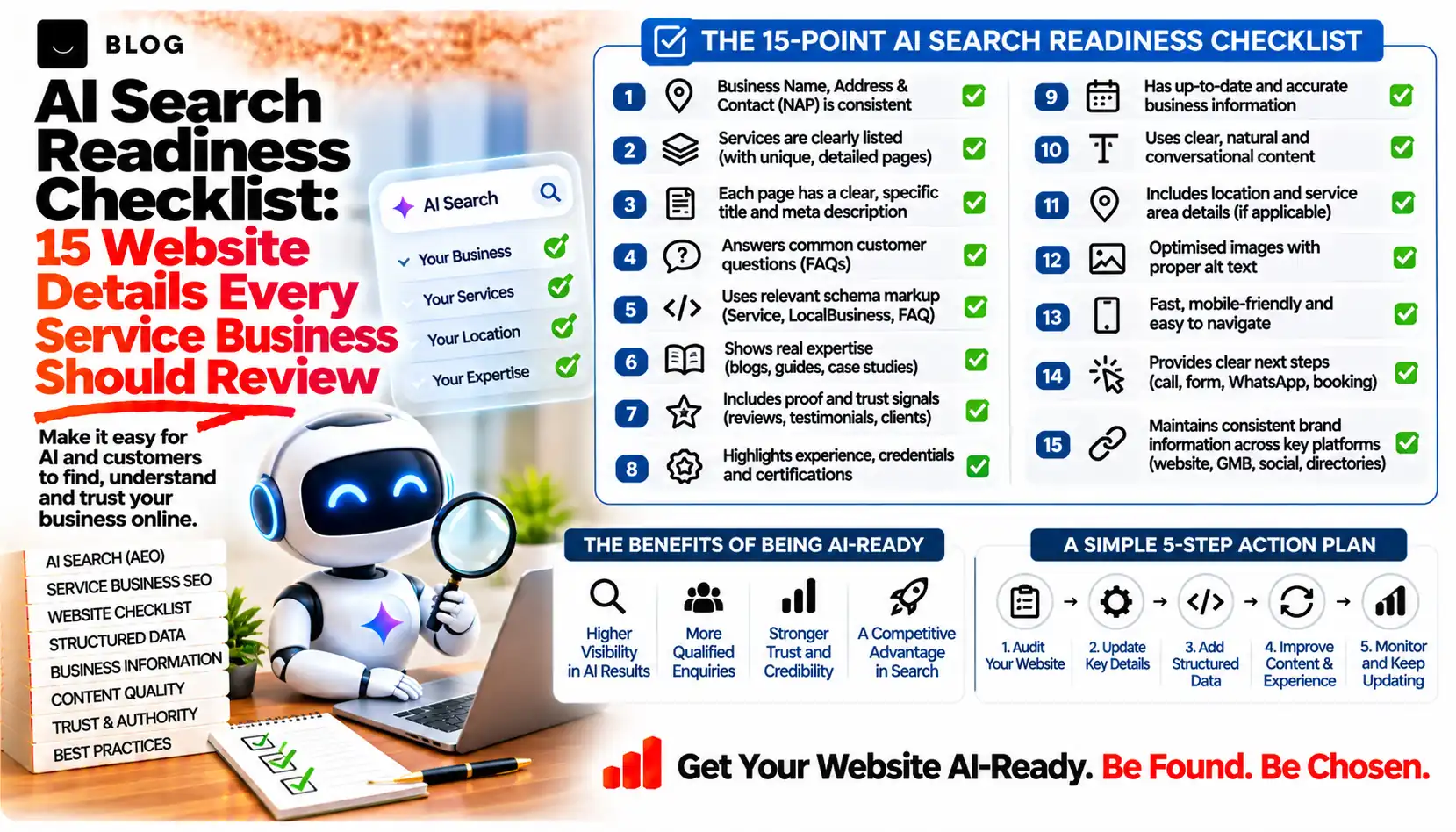
AI Search Readiness Checklist: 15 Website Details Every Service Business Should Review
A prospective client types "best accountant for small businesses in Pune" or "who can fix commercial HVAC in Leeds" into ChatGPT, Gemini or Perplexity. The assistant replies with a short list of names. Some businesses appear in it. Many equally capable ones do not, and their owners rarely find out, because there is no ranking report for a conversation that never reached their website.
The reasons are usually mundane. A crawler is blocked, the service is described in a PDF, the opening hours differ across three listings, or the site never says plainly who the business serves. These are fixable website details, and a business can review them without any special tools or AI-specific markup.
This checklist covers 15 of them, grouped into five areas: access, business identity, answers, structure and measurement. Each item says what to check, why it matters and the mistake to avoid. Nothing here promises a recommendation, because no one outside the AI companies controls that. The aim is to remove avoidable reasons for being left out.
What an AI search readiness review can and cannot do
A readiness review can show whether search systems and AI assistants are able to reach, read and understand your business information, and whether that information is consistent. It can also reveal gaps a human visitor would notice: unclear services, missing prices, no proof.
It cannot guarantee that ChatGPT, Gemini or Perplexity will mention you. Each system uses its own retrieval methods and changes them, and an assistant may answer from sources you do not control, such as directories and review sites. Google's own guidance for its AI features says there are no extra requirements beyond foundational SEO practices, so treat this checklist as good website hygiene with AI discovery in mind, not as a trick.
Part 1: Can AI systems reach your pages?
1. Crawl access in robots.txt, your CDN and your firewall
Check: Open your robots.txt file and your hosting or CDN bot settings. Confirm that Googlebot, OAI-SearchBot and PerplexityBot are not blocked.
Why it matters: Google lists crawl access in robots.txt and through CDN or hosting infrastructure as a basic requirement. OpenAI says sites that opt out of OAI-SearchBot will not be shown in ChatGPT search answers, though they can still appear as plain links. Perplexity recommends allowing PerplexityBot if you want to appear in its results.
Mistake to avoid: Copying a "block all AI bots" rule from an old guide. OpenAI treats its search bot (OAI-SearchBot) and its training bot (GPTBot) as separate settings, so one rule can block more than you intended. Whether to allow training is a business decision, and it is independent of search visibility. Note also that user-initiated fetchers such as ChatGPT-User and Perplexity-User may not follow robots.txt, according to their operators' documentation.
2. Indexability of your key pages
Check: In Google Search Console, inspect your homepage, each main service page and your contact page. Look for noindex tags, wrong canonical tags, redirect loops and error responses.
Why it matters: Google states that a page must be indexed and eligible to appear in Search with a snippet to be shown as a supporting link in AI Overviews or AI Mode. There are no additional technical requirements.
Mistake to avoid: Leaving a staging site's noindex tag in place after a redesign.
3. Important content in text, not only in images, PDFs or scripts
Check: View a service page with scripts disabled, or use the URL Inspection tool to see what Googlebot received. Confirm that services, prices, locations and key claims appear as readable text.
Why it matters: Google recommends making important content available in textual form. A brochure PDF or a text-over-image banner gives a crawler very little to work with.
Mistake to avoid: Putting the only description of a service inside a downloadable PDF.
4. Snippet controls that do not work against you
Check: Search your templates for nosnippet, data-nosnippet and max-snippet directives.
Why it matters: These controls limit what Google shows from your pages, and Google names them as the way to limit content in its AI features. They are useful for content you genuinely want to restrict, but a blanket nosnippet works against being shown.
Mistake to avoid: A site-wide setting added by a plugin years ago that nobody remembers.
Part 2: Does your site say clearly who you are?
5. A plain statement of who you are, what you do and where
Check: Read your homepage as a stranger. Within the first screen, can you tell the business name, the main services, the locations or areas served, and how to make contact?
Why it matters: An assistant building an answer about your business needs those facts stated directly. Vague taglines such as "empowering growth" give it nothing to repeat.
Mistake to avoid: Describing the business in brand language and never naming the service.
6. One page per core service
Check: List your main services. Each should have its own page covering what the service is, who it suits, how it works, what is included and how to start.
Why it matters: A single "Services" page listing eight offerings in a sentence each cannot answer a specific question well. Separate pages give both people and AI systems a clear page to cite per topic.
Mistake to avoid: Creating near-identical pages that differ only by city name. Each page needs real information.
7. Consistent business details everywhere
Check: Compare your name, address, phone number, opening hours, service areas and category across your website, Google Business Profile, social profiles and main directories.
Why it matters: Google advises keeping Business Profile information up to date, and conflicting details across sources are a common reason an assistant repeats something wrong. The post on why AI assistants get business details wrong covers this problem in depth.
Mistake to avoid: Updating the website after a move or rebrand but not the third-party listings.
8. Named people and visible credentials
Check: Does the site show who runs the business and who delivers the work, with roles, relevant qualifications, memberships or licences where they apply?
Why it matters: Trust signals help readers judge a provider, and they give any system summarising your business something concrete to describe.
Mistake to avoid: Listing credentials you cannot document, or using stock photos as the team page.
Part 3: Does the content answer what buyers ask?
9. Answers to real customer questions
Check: Collect the questions prospects ask on calls, in emails and in reviews. Confirm each has a clear answer on a relevant page.
Why it matters: People now ask assistants full questions, such as "how much does a loft conversion cost in Bristol", not keywords. Pages that answer plainly are easier to use. The customer questions post in this series provides a starter list of 17.
Mistake to avoid: Hiding answers behind a "contact us for details" button.
10. Pricing approach, timelines and policies
Check: State what you can: price ranges or what drives the price, typical timelines, minimum engagement, payment terms, cancellation and guarantees.
Why it matters: Cost and timing are among the most common questions in a buying journey. If your site is silent, the assistant either skips you or fills the gap from elsewhere.
Mistake to avoid: Publishing a price you do not honour. Use ranges, dates and conditions.
11. Real proof, clearly dated
Check: Review testimonials, case studies, ratings and project examples. Each should be real, attributable and dated, with client permission.
Why it matters: Proof separates a business that says it is good from one that shows it. Reviews on third-party platforms also shape what assistants say about you.
Mistake to avoid: Round numbers without a source, anonymous praise, or results that cannot be traced to a real project.
Part 4: Is the site structured so it can be understood?
12. Clear headings and internal links
Check: Each page should have one H1, logical H2 and H3 headings, and links from relevant pages. Your key pages should be reachable from the main navigation.
Why it matters: Google recommends making content findable through internal links. Descriptive headings also make it easier to lift a self-contained answer from a page.
Mistake to avoid: Orphaned service pages that nothing links to.
13. Structured data that matches the visible page
Check: If you use schema.org markup (for example Organization or LocalBusiness), validate it in Google's Rich Results Test and compare it with what visitors can see.
Why it matters: Google states that its AI features need no special schema.org markup, and that structured data should match the visible text. Markup helps search engines understand a page, but it is not an AI switch.
Mistake to avoid: Adding markup for prices, ratings or hours that appear nowhere on the page.
14. Mobile experience and page speed
Check: Open your top pages on a mid-range phone. Test them in PageSpeed Insights. Make sure forms, phone numbers and maps work.
Why it matters: Google lists page experience among the fundamentals that still apply to AI features. A slow, awkward site loses visitors who do click through.
Mistake to avoid: Fixing the desktop layout only.
Part 5: Do you know how you appear?
15. A monthly check of AI answers and your own data
Check: Create a fixed list of 10 to 15 questions your customers would ask. Once a month, run them in ChatGPT, Gemini and Perplexity, and record whether your business is named, how it is described and which sources are cited. Pair this with Search Console and your server logs.
Why it matters: Google's guide to generative AI features points site owners to the Generative AI performance report in Search Console to see how content performs in those features. Server logs can show which AI crawlers visit. Prompt tests show what a buyer might see, though answers vary between sessions, locations and accounts, so treat them as samples.
Mistake to avoid: Drawing conclusions from a single test or a single day.
How to run this review in practice
You do not need to fix everything at once. Work in this order, because each tier depends on the one before it.
| Priority | Items | Why this order |
|---|---|---|
| 1. Fix blockers | 1, 2, 3, 4 | If systems cannot reach or index a page, nothing else on it matters |
| 2. Fix facts | 5, 6, 7 | Wrong or inconsistent details do the most damage when repeated by an assistant |
| 3. Add depth | 8, 9, 10, 11 | Answers, prices and proof give assistants and buyers reasons to choose you |
| 4. Polish and monitor | 12, 13, 14, 15 | These improve clarity and let you track change |
Assign each item an owner and a date. A short review of your top five pages, covering the homepage, the main service pages and the contact page, will usually surface most of the problems.
Common mistakes to avoid
Treating AI search as a separate project. Google states that foundational SEO practices still apply to its AI features. Most items above improve ordinary search and the visitor experience too.
Chasing special files and markup. Google says you do not need new machine-readable files, AI text files or special schema.org markup to appear in its AI features. Spend the time on content and access instead.
Blocking crawlers without checking what each one does. Search bots and training bots serve different purposes. Read each operator's current documentation before editing robots.txt.
Publishing claims you cannot support. Invented statistics, unattributed reviews and unverifiable awards weaken trust with readers and with any system that checks sources.
Testing once and concluding. AI answers vary by session, location and phrasing. Track patterns over several weeks.
Conclusion
Being recommended by an AI assistant is not something a website can force. It can, however, stop being the reason a good business is overlooked. Open access, accurate and consistent facts, specific answers, real proof and a simple monthly check cover most of what is within your control.
Start with items 1 to 4 this week, since they take the least time and prevent the biggest losses. Then work through the rest at a steady pace.
If you would like an experienced second opinion, Crescent Digital Solutions runs AI search and SEO reviews for service businesses, covering the items in this checklist and a prioritised plan for fixing them.
Frequently asked questions
It is a structured review of the website details that affect whether search systems and AI assistants can reach, understand and accurately describe your business. It covers crawl access, service pages, business facts, proof, structured data and monitoring.
Google says its AI features need no extra machine-readable files, AI text files or special schema.org markup, and that structured data should match the visible page. The OpenAI and Perplexity crawler documentation we reviewed does not ask for one either.
That is a business decision about model training, not about search visibility. OpenAI documents GPTBot and OAI-SearchBot as separate robots.txt settings, and says sites that opt out of OAI-SearchBot will not be shown in ChatGPT search answers.
Run a fixed list of customer questions once a month and record whether you are named, how you are described and which sources appear. Answers vary between sessions, so look for patterns rather than single results.
It varies. OpenAI and Perplexity say robots.txt changes can take up to about 24 hours to be reflected, while Google says recrawling can take anywhere from several days to several months depending on the page. None of them guarantee a mention.
Ready to build what's next?
Tell us where you're headed. We'll come back with a plan to get there.
Book an intro call