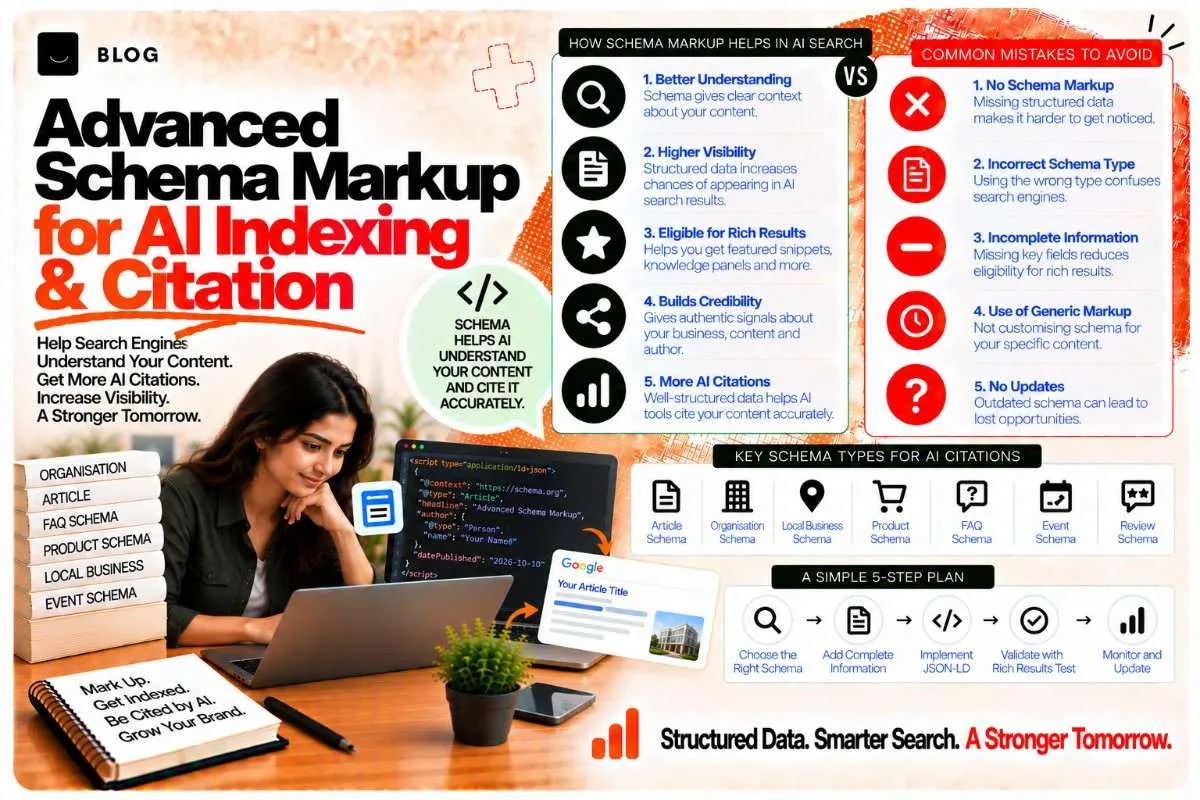
Advanced Schema Markup for AI Indexing & Citation
Schema markup tells search engines what your content is about. But for AI systems, schema markup is much more important.
Traditional Google search can infer content meaning from text and links. AI systems rely heavily on explicit structured data to understand:
- What type of content is this? (Article, How-To, Product, Event, etc.)
- Who created it? (Author schema)
- When was it published/updated? (datePublished, dateModified)
- What's the full content structure? (sections, headings, steps)
Without schema markup, an AI system reading your content might miss crucial information. With proper schema markup, you're giving AI systems a roadmap: "Here's exactly what this content is, who created it, when it was published, and how it's structured."
This guide covers advanced schema markup types that matter for AI indexing and citation.
Why schema markup matters more for AI than traditional ranking
Traditional Google ranking uses schema markup as one signal among many. AI systems use it as a primary source of truth.
For traditional Google ranking:
- Schema helps with SERP presentation (rich snippets, ratings, prices)
- It's one factor in a complex ranking algorithm
- Schema issues don't automatically kill ranking
For AI systems:
- Schema provides explicit, machine-readable answers
- AI systems heavily weight schema data when deciding what content is about
- Schema markup is cited in answer generation
An example:
- Without schema: "The temperature is 72 degrees Fahrenheit."
- With schema: {"@type": "Property", "temperature": {"@value": 72, "@unitCode": "FAH"}}
AI systems can understand and use the second format directly; the first requires text parsing.
Core schema types for AI indexing
1. ArticleSchema — for blog posts and articles
ArticleSchema tells AI systems: "This is a journalistic or informational article."
{ "@context": "https://schema.org", "@type": "Article", "headline": "Advanced Schema Markup for AI Indexing: Complete Guide", "description": "How advanced schema markup helps AI systems index and cite content.", "author": { "@type": "Person", "name": "Abhishek Raikwar", "url": "https://linkedin.com/in/abhishekraikwar-ai-expert" }, "datePublished": "2026-10-12T10:00:00Z", "dateModified": "2026-10-12T10:00:00Z", "image": "https://example.com/image.jpg", "publisher": { "@type": "Organization", "name": "Digital4Local", "logo": { "@type": "ImageObject", "url": "https://example.com/logo.png" } }, "articleBody": "Full article text here...", "wordCount": 2500, "articleSection": "SEO", "keywords": ["schema markup", "AI search", "structured data"] }
Key fields:
- headline — article title
- author — person who wrote it
- datePublished/dateModified — when published and last updated
- articleBody — full text content
- wordCount — number of words
- keywords — topic keywords
2. NewsArticleSchema — for news and timely content
NewsArticleSchema is like ArticleSchema but for journalistic, time-sensitive content.
{ "@context": "https://schema.org", "@type": "NewsArticle", "headline": "New AI Search Algorithm Changes: What You Need to Know", "alternativeHeadline": "AI Search Updates in 2026", "image": "https://example.com/news-image.jpg", "datePublished": "2026-10-12T10:00:00Z", "dateModified": "2026-10-12T12:00:00Z", "author": { "@type": "Person", "name": "Abhishek Raikwar" }, "publisher": { "@type": "Organization", "name": "Digital4Local News" }, "description": "Recent updates to AI search algorithms and what they mean for SEO.", "articleBody": "Full news article text..." }
Use NewsArticleSchema when your content is:
- Time-sensitive news
- Breaking updates in your industry
- Recently published analysis of industry events
3. HowToSchema — for step-by-step guides
HowToSchema tells AI systems: "This is a guide with steps to accomplish a task."
{ "@context": "https://schema.org", "@type": "HowTo", "name": "How to Implement Schema Markup for AI", "description": "Step-by-step guide to adding schema markup to your website.", "image": "https://example.com/howto-image.jpg", "estimatedCost": { "@type": "PriceSpecification", "priceCurrency": "USD", "price": "0" }, "totalTime": "PT2H", "step": [ { "@type": "HowToStep", "position": 1, "name": "Choose your schema type", "description": "Decide which schema type fits your content: Article, HowTo, Product, etc.", "image": "https://example.com/step1.jpg" }, { "@type": "HowToStep", "position": 2, "name": "Write your schema markup", "description": "Create the JSON-LD schema with all required fields.", "image": "https://example.com/step2.jpg" }, { "@type": "HowToStep", "position": 3, "name": "Add it to your page", "description": "Paste the schema into your page's <head> section.", "image": "https://example.com/step3.jpg" } ] }
Key fields:
- name — what this how-to is about
- step — array of steps with position, name, description
- totalTime — estimated time to complete (ISO 8601 format)
- estimatedCost — cost if applicable
4. BreadcrumbListSchema — for site structure and hierarchy
BreadcrumbListSchema tells AI systems how your site is organized.
{ "@context": "https://schema.org", "@type": "BreadcrumbList", "itemListElement": [ { "@type": "ListItem", "position": 1, "name": "Home", "item": "https://example.com" }, { "@type": "ListItem", "position": 2, "name": "Blog", "item": "https://example.com/blog" }, { "@type": "ListItem", "position": 3, "name": "SEO Guides", "item": "https://example.com/blog/seo-guides" }, { "@type": "ListItem", "position": 4, "name": "Advanced Schema Markup", "item": "https://example.com/blog/advanced-schema-markup" } ] }
BreadcrumbList signals topical relationships:
- Home > Blog > SEO Guides > This Article
This tells AI systems that this article is part of a larger SEO Guides cluster.
5. FAQPageSchema — for Q&A content (already covered in other posts)
FAQPageSchema is crucial; we've covered it extensively in other posts. Recap:
{ "@context": "https://schema.org", "@type": "FAQPage", "mainEntity": [ { "@type": "Question", "name": "Does schema markup affect Google ranking?", "acceptedAnswer": { "@type": "Answer", "text": "Yes, but indirectly..." } } ] }
6. ProductSchema — for e-commerce and service offerings
ProductSchema tells AI systems about a product or service.
{ "@context": "https://schema.org", "@type": "Product", "name": "SEO Audit Service", "description": "Comprehensive SEO audit for websites.", "brand": { "@type": "Brand", "name": "Digital4Local" }, "aggregateRating": { "@type": "AggregateRating", "ratingValue": "4.8", "reviewCount": "45" }, "offers": { "@type": "Offer", "price": "500", "priceCurrency": "USD", "availability": "https://schema.org/InStock" }, "image": "https://example.com/service-image.jpg" }
Use for:
- Products you sell
- Services you offer
- Digital products (courses, templates)
7. EventSchema — for upcoming events
EventSchema tells AI systems about an event.
{ "@context": "https://schema.org", "@type": "Event", "name": "SEO Masterclass: AI Search Optimization", "description": "Live webinar on optimizing for AI search systems.", "startDate": "2026-10-20T10:00:00Z", "endDate": "2026-10-20T12:00:00Z", "location": { "@type": "VirtualLocation", "url": "https://example.com/webinar" }, "organizer": { "@type": "Organization", "name": "Digital4Local", "url": "https://digital4local.com" }, "image": "https://example.com/event-image.jpg" }
Schema markup validation and testing
Before deploying schema markup, validate it:
- Google's Schema Markup Validator — paste your schema at https://validator.schema.org
- Google Search Console — use the "Rich Results Test" to see how your schema renders
- Structured Data Testing Tool — https://developers.google.com/search/docs/guides/sd-policies
Validation checks:
- All required fields are present
- Data types are correct (dates in ISO 8601 format, numbers are numbers, etc.)
- No syntax errors in JSON
Advanced schema markup patterns for AI
Pattern 1: Article with structured sections
Use BreadcrumbList + Article with headings that match schema sections:
{ "@type": "Article", "hasPart": [ { "@type": "WebPageElement", "cssSelector": "h2#section1" }, { "@type": "WebPageElement", "cssSelector": "h2#section2" } ] }
This tells AI systems exactly where key sections are.
Pattern 2: How-To embedded in Article
Combine ArticleSchema with embedded HowToSchema:
An article about "SEO Best Practices" can include a HowTo step-by-step guide within it.
Pattern 3: Hierarchical content structure
Use BreadcrumbList to show how content relates:
Home > SEO > On-Page SEO > Title Tags > Optimizing Title Tags for AI
This signals that "Optimizing Title Tags for AI" is a subtopic within On-Page SEO, which is part of SEO.
Common schema markup mistakes to avoid
Don't use incorrect schema types.
Choose the schema type that actually describes your content. Using ProductSchema for a blog post confuses AI systems.
Don't leave required fields blank.
Every schema type has required fields. A HowToSchema without steps is incomplete.
Don't mix schema types incorrectly.
While you can combine schemas, mixing them inappropriately (e.g., mixing Article with Event) creates confusion.
Don't use outdated schema.
Always reference schema.org version 13+ (as of 2026). Old versions may lack fields AI systems expect.
Don't forget dateModified.
When you update content, update the dateModified field. This signals to AI systems that the content is fresh.
Don't ignore schema nesting.
Nested schema (author inside Article, step inside HowTo) must follow the correct hierarchy.
Frequently asked questions
No, but high-value pages (main articles, product pages, key services) absolutely should have it. Aim for schema on 80%+ of your site.
ArticleSchema and NewsArticleSchema. They clearly establish authorship, publication date, and content type, all of which AI systems use when deciding whether to cite you.
No. Schema markup must describe your own content. Using another site's schema to describe your content is misleading and will be detected by AI systems.
Indirectly. Schema helps with rich results (snippets, ratings, prices) which can improve CTR, but it's not a direct ranking factor like backlinks or content quality.
Meta tags (title, description) are in the page's head and appear in search results. Schema markup is structured data that search engines and AI systems parse. They serve different purposes and should both be used.
Update schema whenever your content changes. If you update an article, update dateModified. If you add a new step to a HowTo, update the step array.
Ready to build what's next?
Tell us where you're headed. We'll come back with a plan to get there.
Book an intro call